 Scale Relay
Send weight from Apple Health to Garmin Connect on your iPhone
Garmin Connect writes to Apple Health, but it does not read weight from it. So the weigh-in your scale's app saved to the Health app stops there. Scale Relay reads that weigh-in from Health and sends it to Garmin Connect with one tap: weight always, body fat and BMI when your scale's app recorded them. It works with any scale whose companion app saves weigh-ins to Apple Health: Withings, Renpho, Eufy, Etekcity, Wyze, Picooc, Zepp Life and most others.
Free to try. Your first two syncs are free and show weigh-ins from the last 7 days. The one-time Garmin Sync purchase ($14.99, no subscription) unlocks further sends and older history.
How the Apple Health route works
Every smart scale comes with its own app, and almost every one of those apps can write each weigh-in to Apple Health. Scale Relay does not talk to the scale on this route at all. It asks Apple Health for the weigh-ins your scale's app already saved, shows you which ones are new, and sends the ones you choose to your Garmin account. Garmin Connect then shows them under Health Stats › Weight, the same way it shows a weigh-in from a Garmin Index scale.
Because it reads what the scale's app wrote, it only relays values that app actually recorded. Weight is always there. Body fat percentage and BMI arrive when the scale's app writes them to Health, which most body-composition scales do. Muscle mass, water and bone mass are not Apple Health weight types, so no app can pass them this way; they travel only on Scale Relay's Bluetooth route with a Xiaomi scale.
Which scale apps write weight to Apple Health
The steps below come from each maker's own support pages, linked and checked in September 2026. Menus move between app versions, so if a screen looks different, look for "Apple Health", "Health" or "Third-party apps" in the scale app's settings.
Withings (Body, Body+, Body Comp, Body Scan)
In the Withings app go to your profile › Apps › Apple Health and allow the categories you want to share. Withings writes weight, body fat and BMI; its support notes that lean mass, muscle mass, water and bone mass are not synced, and that the Withings app has to be opened and refreshed for a new weigh-in to reach Apple Health. Keep Background App Refresh on for the Withings app. Source: Withings support, Partner Apps: Apple Health. New accounts: Withings asks accounts created on or after 13 October 2026 to subscribe to Withings+ before it shares data with Apple Health; older accounts keep sharing for free. Without Withings+, bring your history over with the free Withings import tool. Full walkthrough: Withings scale to Garmin Connect.
Renpho (Renpho Health app)
On first launch Renpho Health asks for Health access; tap Allow. If you skipped it, open the iPhone Health app › your profile picture › Apps › Renpho Health › Turn All Categories On. Renpho writes weight, body fat percentage, BMI and lean body mass. If you use the older "Renpho" app rather than "Renpho Health", the same switches live in the Health app. Source: Renpho, Apple Health Kit setting guide. Full walkthrough: Renpho scale to Garmin Connect.
Eufy (EufyLife app: P1, P2, P3, C1, Smart Scale)
Pair the scale in EufyLife first, then in the app enable sharing with Apple Health; EufyLife then writes weight, body fat percentage, BMI, height and lean body mass after each weighing. Nothing is shared until you switch it on. Source: eufy support, syncing with Apple Health. Full walkthrough: eufy scale to Garmin Connect.
Etekcity (VeSync app)
Connect the scale to VeSync, then connect VeSync to Apple Health from the app's settings. VeSync writes weight and the body-composition values Apple Health has a type for. Source: Etekcity, ESF-551 product page ("sync your results with Apple Health"). Full walkthrough: Etekcity scale to Garmin Connect.
Wyze Scale (Wyze app: Scale S, X, Ultra)
Open the Wyze app, tap the scale, tap the gear, choose Authorize 3rd-Party Apps › Apple Health and follow the prompts. Weight and body fat percentage sync; Wyze's other metrics have no Apple Health type. Source: Wyze support, sync the Wyze app with Apple Health.
Zepp Life (Xiaomi scales when you keep the Xiaomi app)
Open the iPhone Health app › profile picture › Apps › Zepp Life and allow weight. Zepp Life then writes the weigh-ins from a Mi Body Composition Scale 2 to Apple Health. With this scale you can also skip Zepp Life entirely and let Scale Relay read the scale over Bluetooth, which carries the full body composition; see the Scale 2 guide. Source: Xiaomi support, sync Zepp Life to the Health app.
Picooc
The PICOOC app syncs each measurement to Apple Health once you allow it in the app's settings. Source: PICOOC on the App Store.
Fitdays (Posture, Healthkeep, ABLEGRID and unbranded scales)
In Fitdays open the Me tab › Settings and turn on Apple Health, or allow it under Health › Apps › Fitdays. Full walkthrough: Fitdays scale to Garmin Connect.
Any other scale
Open the iPhone Health app › your profile picture › Apps. If your scale's app is listed and weight is switched on, Scale Relay will see its weigh-ins. If the app is not there, it does not write to Health and this route will not work; tell us the model, requests decide what gets added next.
Step by step
-
Weigh yourself as usual
Nothing changes about how you weigh. Your scale's app records the weigh-in the way it always has.
-
Open your scale's app once
Most scale apps write to Apple Health when they open or refresh, not while they sit in the background. Opening the app after weighing is what puts the weigh-in into Health.
-
Open Scale Relay's Health tab
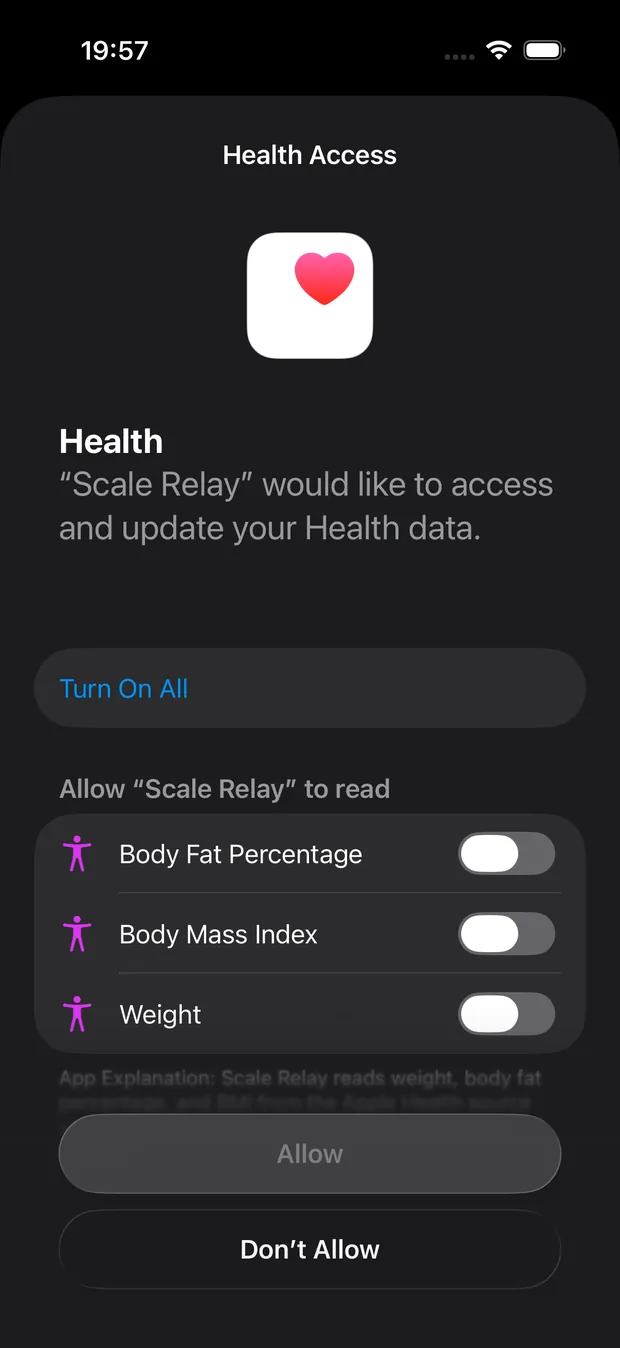
Install Scale Relay, open the Health tab and connect Apple Health. iOS shows the permission screen; allow weight, body fat percentage and BMI. Scale Relay only reads on this route; it never writes back what it found in Health.
-
Choose the source and connect Garmin
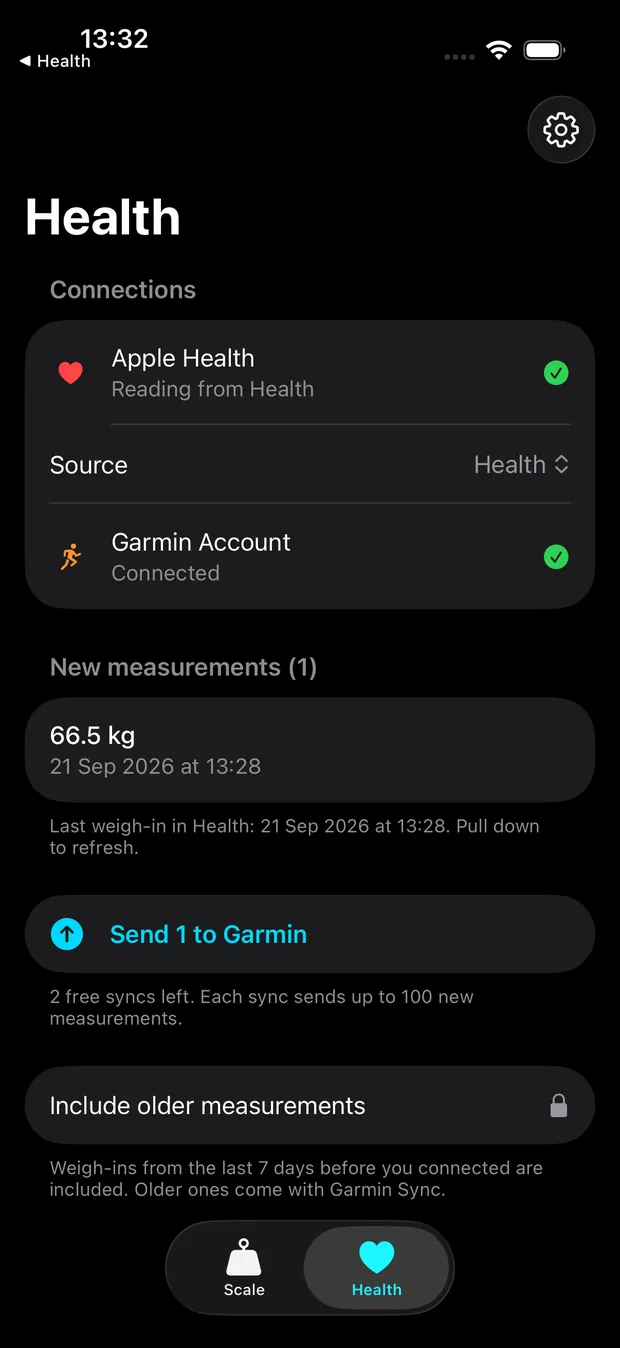
Pick which app's weigh-ins to relay, so the same measurement is never sent twice from two sources. Sign in to Garmin Connect with your Garmin email and password; two-factor codes are supported. The sign-in goes to Garmin only and the session token is kept in the iOS Keychain.
-
Review and tap Send
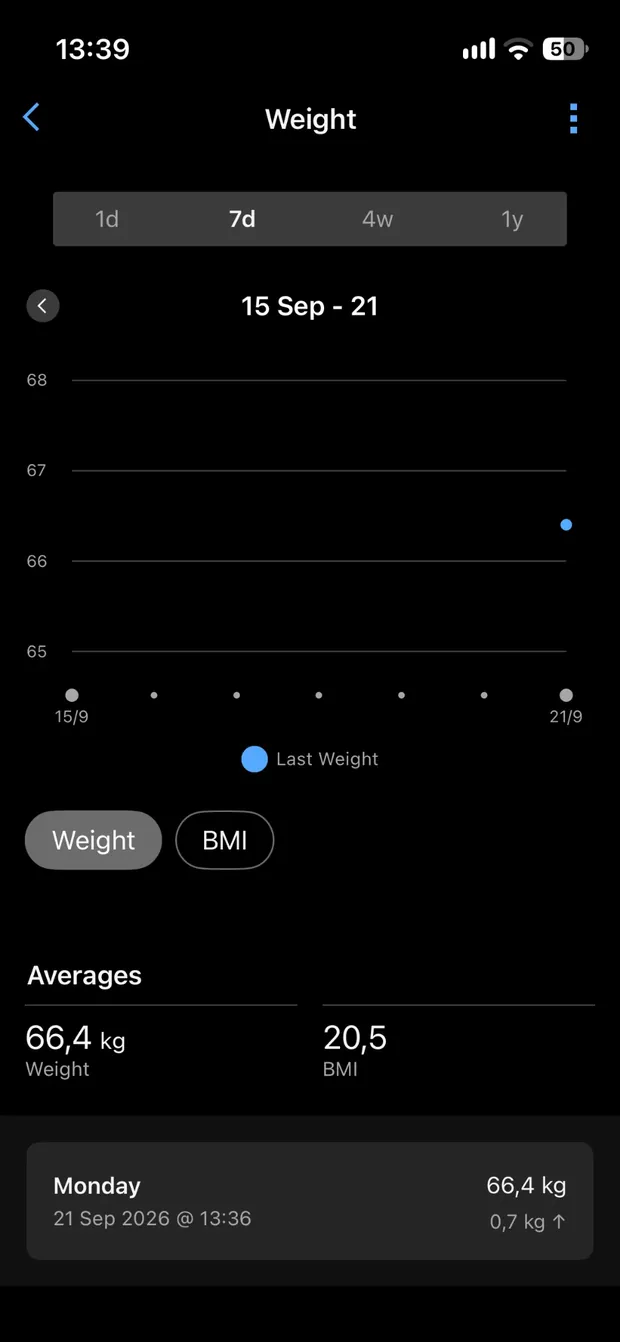
New weigh-ins appear as a list with the values that will go to Garmin. Tap Send. Scale Relay confirms each one Garmin accepted and keeps a "Sent to Garmin" list, so you always know what arrived. Find them in Garmin Connect under Health Stats › Weight.
Ready to try it? Get Scale Relay on the App Store; the first two Garmin syncs are free.
What is transferred
| Value | Apple Health route | Bluetooth route (Xiaomi Scale 2, S400) |
|---|---|---|
| Weight | Always | Yes |
| Body fat % | When your scale's app wrote it to Health | Yes |
| BMI | When your scale's app wrote it to Health | Yes |
| Muscle mass, body water, bone mass, BMR | No Apple Health type; no app can pass them | Yes |
| Date and time | The weigh-in's own time, as recorded by the scale app | The moment you weighed |
What this route does not do. Sending needs a tap in Scale Relay. There is no background sync, and this route never writes to Apple Health. It relays only what your scale's app saved; it cannot add body fat that the scale never measured.
Other ways from Apple Health to Garmin Connect
| Option | How it sends | Body fat | Garmin 2FA | Cost |
|---|---|---|---|---|
| Scale Relay | You tap Send in the app | Yes, when your scale's app wrote it to Health | Yes | 2 free syncs, then $14.99 once; last 7 days free, older history included |
| WeightSyncr | Manual for free; background sync on the paid plan | Not listed (its App Store page describes weight only, checked 19 Sep 2026) | Yes | Free for manual sync; $0.99/month or $6.99/year |
| SmartScaleSync (web service) | Scheduled, from your Withings, Wyze or Renpho cloud account, not from Apple Health | Yes | Not stated on its site | $2.49/month or $18.99/year; history import $34.99 once |
| Scale app → Apple Health → MyFitnessPal → Garmin | Often needs MyFitnessPal opened | Weight only | Not applicable | Free |
| Manual entry in Garmin Connect | You type it | Weight only | Not applicable | Free |
Fully unattended, phone or not, exists only as a Raspberry Pi or computer bridge such as export2garmin or withings-sync, or by buying a Garmin Index S2. The Xiaomi comparison covers those.
Frequently asked questions
Does Garmin Connect read weight from Apple Health?
No. Today Garmin Connect writes steps, workouts, sleep and weight to Apple Health, but it does not read weight from it. Garmin users have asked for this on the Garmin forums for years; a bridge app is still the only way on an iPhone.
Do I need to keep my scale's app?
Yes. On this route the scale's app is what puts the weigh-in into Apple Health; Scale Relay reads it from there. With a Mi Body Composition Scale 2 or S400 you can drop the Xiaomi app and use the Bluetooth route instead.
My weigh-in is not showing on the Health tab.
Open your scale's app once after weighing so it writes to Apple Health, then pull down to refresh in Scale Relay. Also check the iPhone Health app › profile › Apps › your scale's app: weight has to be switched on there. If you just connected, only the last 7 days are shown until you unlock Garmin Sync.
Will body fat and muscle show up in Garmin?
Body fat and BMI, when your scale's app wrote them to Health. Muscle, water and bone mass have no Apple Health weight type, so they cannot travel this way from any app; with a Xiaomi scale over Bluetooth Scale Relay sends them too.
Is it automatic?
No. New weigh-ins wait on the Health tab and you tap Send. WeightSyncr advertises background sync on its paid plan, weight only; we have not tested it.
Can it send my older history?
Yes. The free tier shows the last 7 days. After the one-time Garmin Sync purchase, switch on "Include older measurements" on the Health tab and send your history in batches.
What does it cost?
The app is free and your first two syncs are free. Unlimited syncing is a one-time $14.99 purchase called Garmin Sync. No subscription, no Scale Relay account.
Is my data private?
Weigh-ins go from your iPhone straight to your own Garmin account. Your Garmin email and password go to Garmin only and are not stored; the session token lives in the iOS Keychain. The app has no analytics, ads or tracking.
Get Scale Relay
Relay weigh-ins from any scale whose app saves them to Apple Health, or read a Xiaomi scale directly over Bluetooth, and send them to Garmin Connect from your iPhone. Two Garmin syncs are free, then a one-time $14.99 purchase.
Download on the App StoreIndependent app. Not affiliated with Garmin, Apple, Withings, Renpho, Anker (eufy), Etekcity, Wyze, Picooc or Xiaomi.